Evaluating Butterfly and Flowers Layered Papercut Designs for Crafting Projects
The Butterfly and Flowers Layered Papercut design represents a specific category of digital crafting assets that bridge the gap between traditional hand-cut artistry and modern digital fabrication. For crafters, designers, and hobbyists, understanding the utility, compatibility, and practical application of such files is essential before integrating them into a workflow. This evaluation explores the characteristics of this layered design, its potential applications, and the technical considerations required to determine if it aligns with your specific project goals.
Understanding the Design Structure
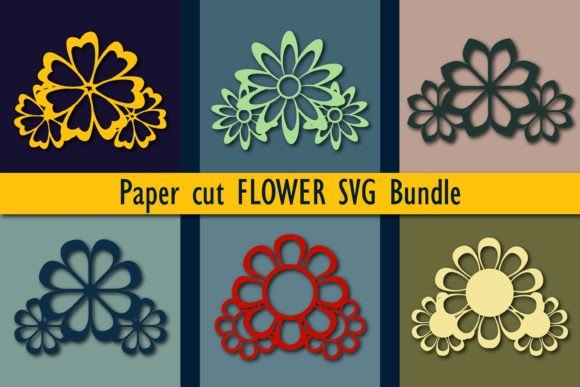
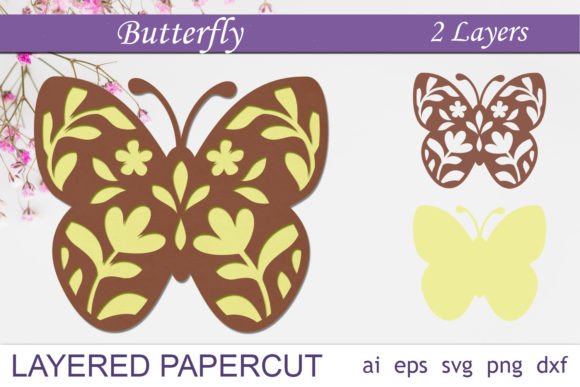
At its core, a Butterfly and Flowers Layered Papercut file is not a single image but a composite of multiple distinct elements stacked to create depth. Unlike a flat illustration, this design utilizes separation to mimic the physical layering of paper. When executed correctly, whether by hand or machine, the overlapping layers cast shadows against one another, creating a three-dimensional effect often referred to as a shadow box aesthetic.
The specific asset in question typically includes a comprehensive set of file formats to ensure broad compatibility. Users generally receive a zip file containing an AI file with all layers intact, an EPS version for vector editing, and multiple SVG and DXF files. Crucially, the inclusion of both "all layers" and "separated layers" versions offers flexibility. The separated files allow users to manipulate individual components—such as isolating the butterfly from the floral background—while the consolidated files preserve the intended composition for immediate cutting.
Primary Applications and Use Cases
The versatility of the Butterfly and Flowers Layered Papercut makes it suitable for a wide array of projects. Its primary strength lies in decorative applications where depth and texture are desired.
- Shadow Boxes: This is the most common application. By cutting each layer from different colored cardstock and stacking them with foam spacers, crafters can create framed art that appears to float within the box.
- Wall Decor: The design can be mounted directly onto a wall or a canvas board, serving as a focal point in nurseries, living rooms, or event spaces.
- Greeting Cards: When scaled down, the separated layers can be adhered to folded cardstock to create intricate pop-up or dimensional greeting cards for birthdays, weddings, or sympathy notes.
- Custom Gifts: The editable nature of the vector files allows users to change colors to match specific themes, making it a strong candidate for personalized gifts.
For those who prefer manual crafting, the provided PNG files with transparent backgrounds serve as excellent templates for tracing and hand-cutting with precision knives. Conversely, owners of automated cutting machines can utilize the vector paths for rapid production.
Technical Compatibility and Machine Requirements
A critical factor in selecting this design is ensuring hardware and software compatibility. The Butterfly and Flowers Layered Papercut is marketed as compatible with major cutting platforms, including Cricut, Silhouette, Brother ScanNCut, CNC lasers, and Glowforge. However, the user must verify their specific setup.
The inclusion of SVG and DXF files caters to most consumer-grade cutting machines. SVG files are generally preferred for Cricut and Silhouette users as they retain layer information and scaling capabilities without loss of quality. DXF files are often necessary for older software versions or specific CAD-based workflows. For laser cutter enthusiasts, the AI and EPS files provide the precise vector paths needed for engraving or cutting through materials like wood veneer or acrylic, though the 8x8 inch size may require tiling for larger projects.
It is important to note that while the files are editable, the complexity of the layers demands a machine capable of handling intricate details. Very fine lines in the flower petals or butterfly wings may require high-quality blade settings or specific laser power configurations to prevent tearing or burning.
Benefits and Tradeoffs
Adopting a pre-made layered design offers significant advantages, primarily in time efficiency and design consistency. Creating a balanced composition with proper negative space and structural integrity for layering requires advanced graphic design skills. By utilizing a professional Butterfly and Flowers Layered Papercut file, users bypass the design phase and move directly to production.
However, there are tradeoffs to consider. The standardized 8x8 inch size, while convenient for standard frames, may limit users looking for large-scale installations unless they possess the skills to scale and reinforce the vector paths without distorting the delicate cut lines. Additionally, while the files are editable, achieving a truly custom look requires proficiency in vector software like Adobe Illustrator or Inkscape. Users unfamiliar with node editing or color separation may find themselves restricted to the default configuration.
Another consideration is material waste. Layered designs inherently require more material than flat cuts because multiple sheets are needed to build depth. Crafters working with expensive specialty papers should calculate the total square footage required for all layers before beginning.
Decision-Making Insights: Is This Design Right for You?
Determining whether to invest in this specific digital asset depends on your current resources and project objectives. The Butterfly and Flowers Layered Papercut is a strong fit if:
- You own a compatible cutting machine or have access to one and understand how to import SVG or DXF files.
- Your goal is to create dimensional art, such as shadow boxes or layered cards, rather than flat prints.
- You value design symmetry and professional composition over creating a design from scratch.
- You have the patience to assemble multiple layers, which involves precise alignment and adhesion.
Conversely, this design may not be the optimal choice if you require a simple, single-layer silhouette for quick vinyl decals, or if you lack the software knowledge to separate layers for custom coloring. Furthermore, if your project demands a size significantly larger than 8x8 inches and you are unsure how to scale vector graphics while maintaining cuttable line weights, a different solution might be necessary.
Final Considerations for Project Success
Success with the Butterfly and Flowers Layered Papercut relies heavily on material selection and assembly technique. When using cardstock, varying the shades slightly between layers can enhance the 3D effect even without lighting changes. For laser cutting, testing power settings on scrap material is advisable to ensure the fine details of the flowers do not disintegrate.
Ultimately, this digital file serves as a versatile foundation for creative expression. It balances the convenience of ready-to-cut technology with the artistic potential of traditional papercraft. By evaluating your machine capabilities, material constraints, and desired outcome, you can effectively determine if this layered design will meet your crafting needs and elevate your final project.